Software for Windows

Quantvestor Terminal
and Quantvestor Charts

Market monitor, news, economic calendar, curves, options and charts with the VERA studies, in one platform. Use it with your Bloomberg Terminal or on any PC.

No card needed for the trial · Windows 10 and 11 (64-bit) · English and Spanish
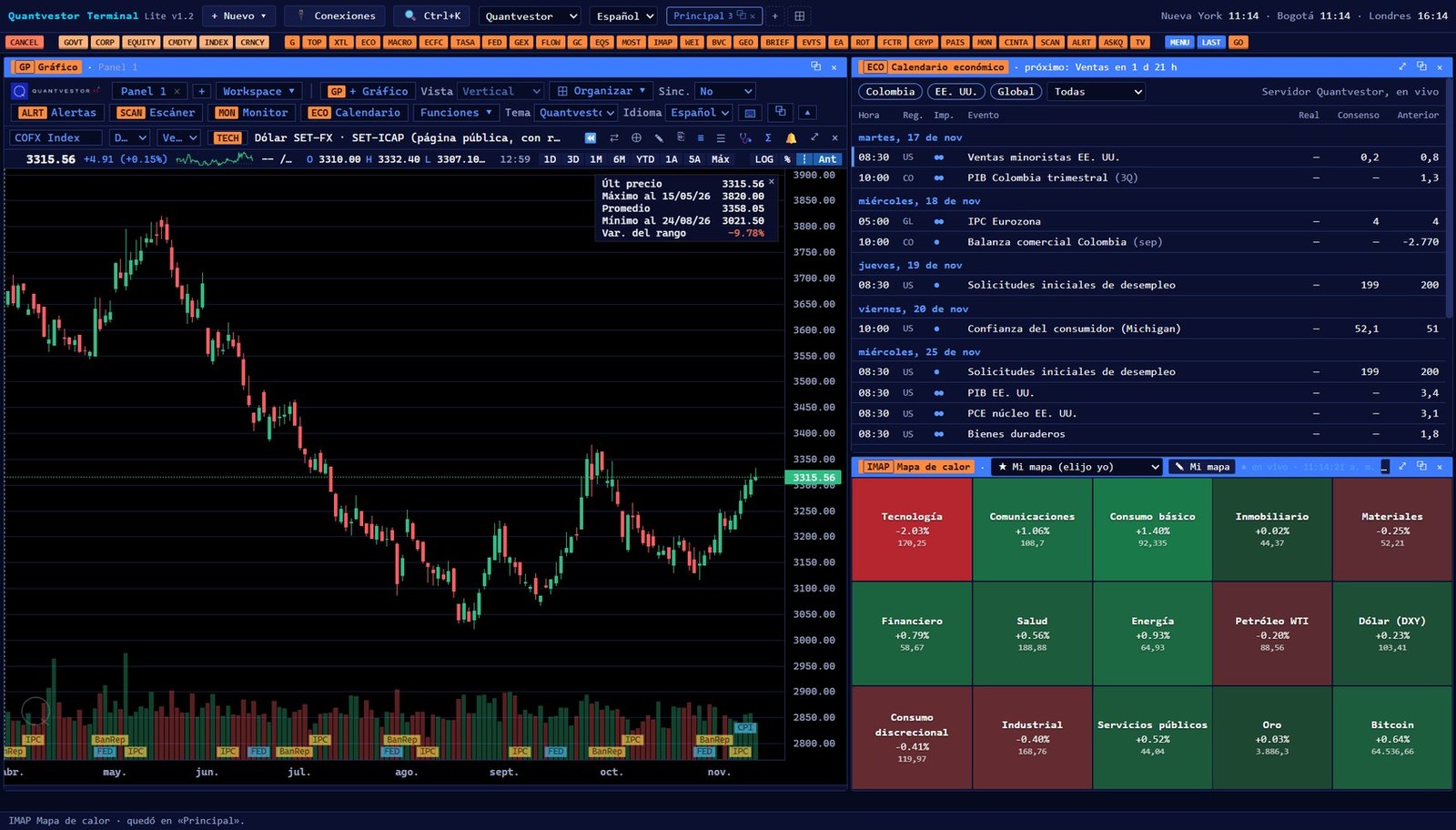
Quantvestor Terminal and Charts running on three screens

TERMINAL · CHARTS · MULTI-MONITOR

Two products, each with a Pro and a Lite edition

Pro runs on the PC where you have Bloomberg Terminal. Lite runs on any Windows PC.

Quantvestor Terminal

The full workstation: panels you arrange your way across one or more monitors.

  • Market monitor, price ticker and heat maps
  • Translated news, read aloud
  • Economic calendar with actual and consensus figures
  • The Fed, policy rates, yield curves, macro and country forecasts
  • Options and GEX, ETF flows, sector rotation
  • AI analysis committee and Q&A assistant
  • Includes the charts with VERA studies

Quantvestor Charts

Just the charts, fast and light, for traders who watch price.

  • Candles, profiles and multi-monitor workspaces
  • VERA studies (Trend, Flow, Weight, cross levels)
  • Forecasts, GEX levels, support and resistance on the chart
  • Price and indicator alerts, with voice
  • Saved templates and window sync

See it in action

Real screenshots of the software.

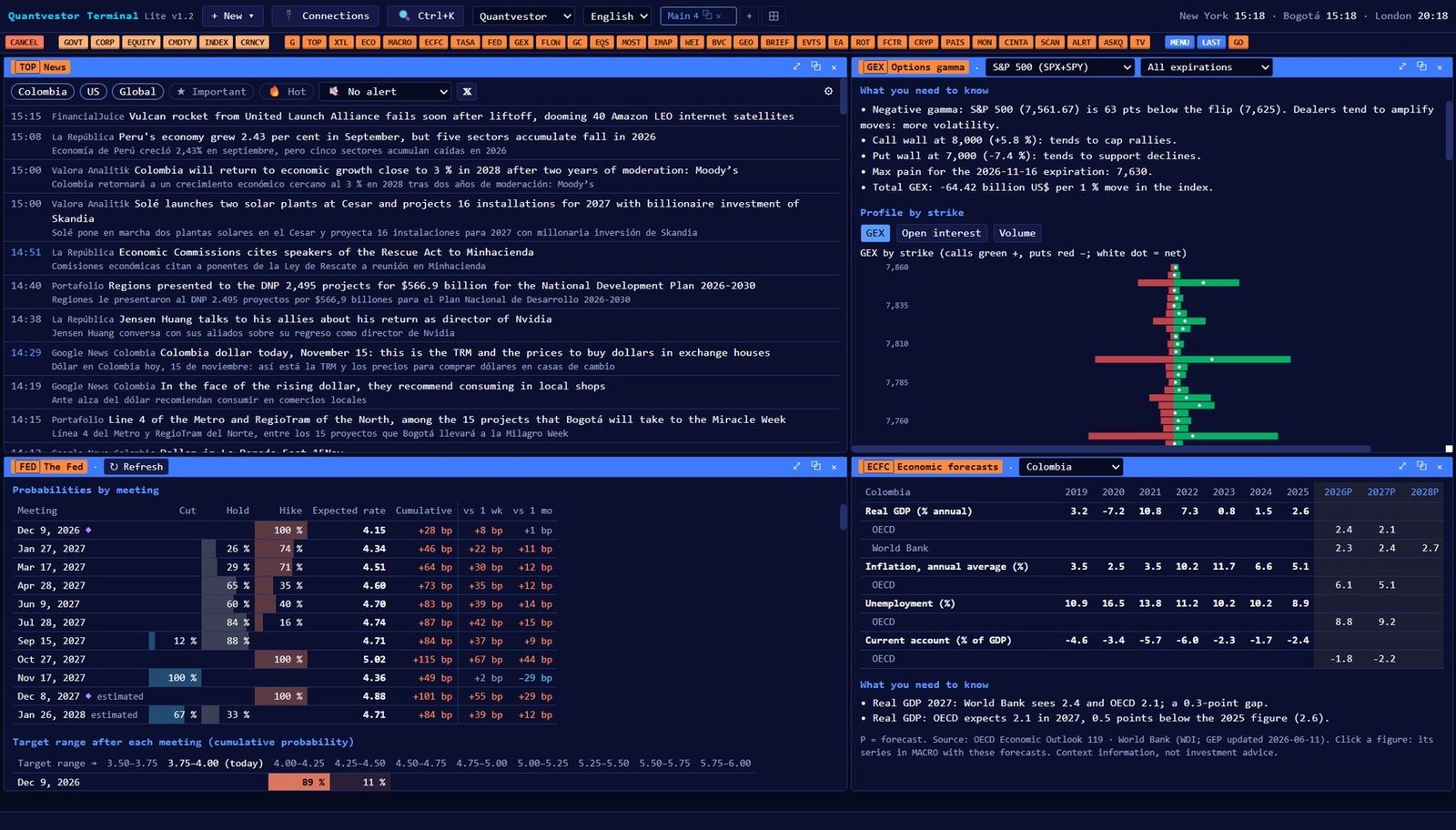
Terminal · the Fed, GEX, news and macro
Quantvestor Terminal with the Fed, GEX, translated news and macro data
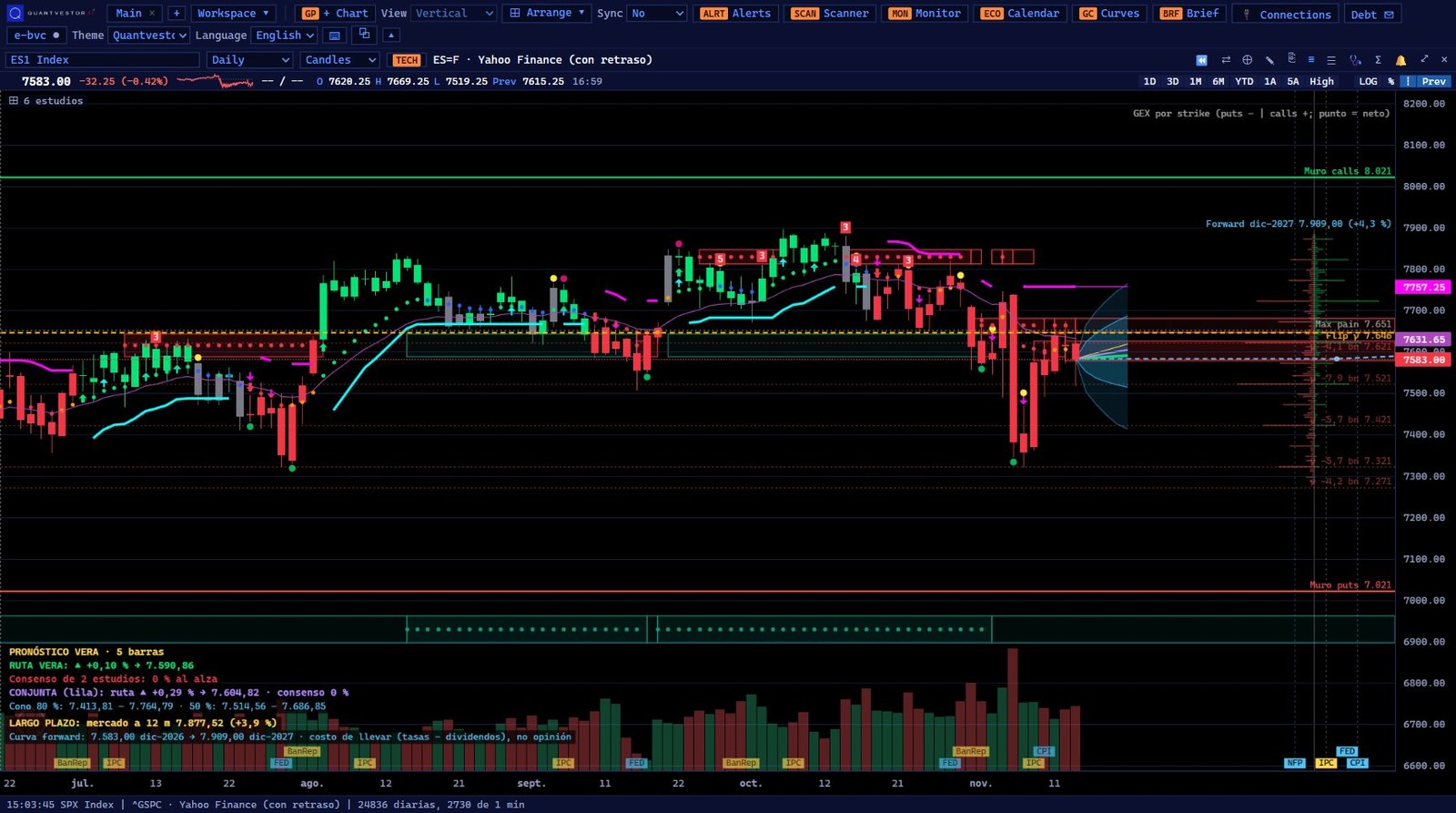
Charts · forecasts, GEX, support and resistance
Quantvestor Charts with forecast cone, GEX levels, support and resistance and VERA studies

Every function

Each function opens with its code, just like in the software. The Terminal includes all of them; Charts includes the charts, studies, forecasts, GEX and alerts.

Quantvestor Terminal price ticker

Charts and studies

GP
ChartCandles on any timeframe with VERA studies, forecasts, GEX and support and resistance.
TECH
Indicators and studiesAdd the VERA studies and technical indicators to the chart.
HP
Historical pricesDaily price table to review or export.
G
Saved chartsYour chart templates (G1, G2…) one click away.
ALRT
AlertsPrice and indicator alerts, with spoken notice.
SCAN
ScannerRuns through your assets and shows which ones meet the study and forecast conditions.

Live markets

MON
Market monitorYour assets in a table with price, change and day range.
CINTA
Price tickerA thin bar always on top with your monitor assets moving.
IMAP
Heat mapSectors and whatever you choose (gold, oil, currencies) in green and red.
WEI
World indicesMarkets in the Americas, Europe and Asia by region.
MOST
Most activeToday's top gainers, losers and most traded stocks.
EQS
Stock screenerFilter stocks by sector, size and metrics.
BVC
Colombian stocksHeat map of the Colombian stock exchange.
CRYP
CryptoBitcoin and the main cryptocurrencies in real time.

Options and flows

GEX
Options gammaGamma by strike, call and put walls, flip and heat map for the S&P, Nasdaq, Russell and Dow.
OMON
Option chainStrikes, premiums, volume and open interest for US stocks.
FLOW
ETF flowsWhere money is flowing in and out.
ROT
Sector rotationWhich sectors are gaining or losing strength against the market.

Macro, rates and calendar

FED
The FedMeeting probabilities, dot plot, projections, statements and minutes.
TASA
Policy ratesWhere the Fed and Colombia's central bank are heading.
MACRO
Macro dataInflation, jobs, GDP and what drives them.
ECFC
Economic forecastsMulti-year projections by country from several sources.
GC
Yield curvesUS Treasury and Colombian TES curves.
ECO
Economic calendarUpcoming releases with time, consensus, prior and the actual figure as it comes out.
EVTS
Earnings calendarWhich companies report and when.
EA
Earnings seasonHow S&P 500 reports are going by sector.
GEO
Country riskStatistics and risks for each country.
PAIS
Country panelEverything about Colombia or the US in one view.

Assets, news and AI

DES
DescriptionCompany profile, P/E, dividend and analysts.
RES
Asset summaryWhat happened, why, key metrics and forecast, on one page.
ERN
EarningsActual EPS versus expectations, quarter by quarter.
TOP
Top newsTranslated headlines, read aloud.
XTL
X accountsWhat market-moving accounts are posting.
BRIEF
Morning briefingA summary of the day before the open.
TV
Live TVFinancial channels inside the Terminal.
CMTE
AI analysis committeeVirtual analysts with a bull case, bear case and risks.
ASKQ
Ask QuantvestorAI assistant to ask about the market or an asset.

Research

FCTR
Factor labWhich factors have explained returns.
DSR
Strategy validatorChecks whether a backtest shows an edge or could be luck (Deflated Sharpe).

Downloads

Install, open the software and enter your email: the 30-day trial starts on its own. Updates arrive in one click from inside the software. Want to see it first? Download the user manual (PDF) (40 MB, with screenshots of every function and study).

TERMINAL · LITE

Terminal Lite

For any Windows PC. Connects from your computer to public sources and to your own data accounts.

v1.2 · 59 MB
TERMINAL · PRO

Terminal Pro

For the PC where you have Bloomberg Terminal. Uses your own Bloomberg license as the data source.

v1.2 · 65 MB · requires your own Bloomberg license
CHARTS · LITE

Charts Lite

The charts on any Windows PC, with public sources and your own data accounts.

v1.2 · 58 MB
CHARTS · PRO

Charts Pro

The charts with your Bloomberg Terminal as the data source.

v1.2 · 64 MB · requires your own Bloomberg license

How it works

01

Download

Choose Terminal or Charts, Pro or Lite, and install it on Windows.

02

Try it for 30 days

Open it and enter your email. Everything is unlocked, VERA studies included. No card, no keys.

03

Subscribe

From the software or from this page, with the same email. Access renews automatically every month or year.

04

Manage

Change your card or plan, or cancel any time from your customer portal.

Plans

Pro runs on the PC with Bloomberg Terminal; Lite runs on any PC. Secure payments with Stripe, in US dollars.

Pro

Terminal Pro or Charts Pro

US$300 / month
  • Runs on the PC with Bloomberg Terminal
  • Uses your own Bloomberg license
  • Terminal Pro or Charts Pro, with VERA studies
  • Updates included · English and Spanish
Lite

Terminal Lite

US$100 / month
  • On any Windows PC
  • The full Terminal, with charts and VERA studies
  • Public sources and your own accounts, from your PC
  • Updates included · English and Spanish
Lite

Charts Lite

US$50 / month
  • On any Windows PC
  • Charts only, with VERA studies
  • Public sources and your own accounts, from your PC
  • Updates included · English and Spanish
TradingView

VERA indicators on TradingView

US$49.99 / month
  • Invite-only VERA scripts
  • Activated on your TradingView username
  • Nothing to install: works on web, desktop and mobile
  • Updates included
Enter your TradingView username at checkout. Access is active within 24 hours.
ProLite
Where it runsOn the PC where you have Bloomberg TerminalOn any Windows PC
DataYour own Bloomberg licensePublic sources and your own data accounts, queried from your PC
Monthly priceUS$300 (Terminal Pro or Charts Pro)Terminal Lite US$100 · Charts Lite US$50
Yearly price30% off 12 months
ComputersOne PC per subscription; you can move it from inside the software

Frequently asked questions

Do I need a card for the trial?

No. Download, open the software and enter your email. You get 30 full days. At the end it asks you to subscribe to keep going.

What is the difference between Pro and Lite?

Only the data source and where you use it. Pro runs on the PC where you have Bloomberg Terminal and uses your license. Lite runs on any PC and connects from your computer to public sources and your own accounts. Pro is US$300 a month (Terminal Pro or Charts Pro); Terminal Lite is US$100 and Charts Lite US$50.

Does Quantvestor sell data?

No. Quantvestor sells the software. Your own computer queries the data, with your Bloomberg license in Pro, or public sources and your own accounts in Lite. Each source has its own terms of use.

How do I activate the VERA studies?

They turn on with your trial or subscription. No keys to type and no files to copy.

Can I change PCs?

Yes. Each subscription covers one PC; from inside the software you release the old computer and activate the new one with the same email.

How do I cancel or change plans?

From the customer portal (linked in the software and in your receipt email). If you cancel, you keep access until the end of the paid period.

What do I need to install it?

Windows 10 or 11, 64-bit, and an internet connection. For Pro, Bloomberg Terminal with your active license on the same PC.